

A UGC creator makes paid videos or photos for a brand to use in its marketing. I treat hiring one as buying content, not followers, because your brand usually publishes the files or runs them as ads.
If your brand needs product videos but doesn’t need access to someone’s audience, a UGC creator can fit that job. For example, you could commission 3 product demos with 2 opening hooks each, giving you 6 versions to test. That is a production example, not a promise of better sales.
Creators make demonstrations, unboxings, tutorials, testimonials, problem and solution videos, and lifestyle clips. Brands hire them to show products in use, test different messages, speak to specific customer groups, reuse licensed files, and reduce filming overhead.
In this guide, I’ll explain the work, the difference from influencers, pricing, hiring, and measurement so you can judge the scope before paying. <u>The production fee and permission to use the content are separate terms</u>, so both need to be clear before filming.
Key Takeaways
- A UGC creator makes paid marketing content, and brands pay for the files instead of access to followers.
- Brands hire UGC creators for product demos, video variations, customer perspectives, licensed assets, and simpler production.
- Pairing 3 video bodies with 2 hooks produces 6 finished versions to test.
- A creator agreement should state deliverables, fees, revisions, and usage rights.
- Paid testimonials must reflect the creator’s actual experience and include any required advertising disclosures.
I’ll start with the content a UGC creator makes and the permissions your brand needs to use it.
Understanding UGC in 8 minutes [video examples]
sbb-itb-1e69e94Introduction
A UGC creator makes content that brands can use in ads, with different hooks, formats, or angles to test which versions work best. Brands can also use this content on product pages and in social posts, depending on the license they agree to with the creator.
This article explains what UGC creators do, how they differ from influencers, and why brands hire them.
What Is a UGC Creator?
A UGC creator makes paid, customer-style videos or photos for a brand’s marketing. UGC stands for user-generated content. In this context, the brand requests and pays for the content directly.
As a UGC creator, you follow a brand’s brief, so your paid content is not an independent review. The brand chooses a format based on its marketing goal.
| Content type | Marketing use |
|---|---|
| Demonstrations | Show how the product works. |
| Unboxings | Show packaging and first impressions. |
| Tutorials | Explain how to use the product. |
| Testimonials | Build trust through a review presented from a peer’s perspective. |
| Problem-solution videos | Show the product solving a problem. |
| Lifestyle clips | Show the product in daily use. |
For home goods, these formats might look like the following examples:
Demonstration: Showing how a handheld garment steamer removes wrinkles from a linen shirt.
Unboxing: Opening a new set of ceramic cookware and showing the protective packaging.
Tutorial: A guide on how to assemble and style a modular bookshelf.
Testimonial: A creator explaining how a specific ergonomic pillow reduced their neck pain.
Problem-solution video: Showing a stained rug and the effectiveness of a natural cleaner.
Lifestyle clip: A creator using a high-end espresso machine during their “morning routine” vlog.
The format defines the video or photo you deliver. Usage rights determine where the brand can publish that content.
What Does a UGC Creator Do for a Brand?
A UGC creator uses your brand brief to write scripts, film product demos, and make vertical videos with captions and a call to action. They also complete the revisions you agreed on.
Creators usually film themselves speaking to the camera, record voiceovers, and shoot from their own point of view. They edit the footage and add captions so viewers can follow the message.
The contract should list the deliverables, revision rounds, and whether raw footage is included. These details tell you what the creator will provide before filming starts.
The creator submits the final cut. Your brand approves claims, publishes the videos, and runs the ads. Any testimonial must reflect the creator’s actual experience.
UGC Creators vs. Influencers: What's the Difference?
UGC creators sell content. Influencers sell distribution. Your brand pays for either content it can use or access to a creator’s existing audience. If you need content, not reach, this distinction helps you choose who to hire.
| UGC creator | Influencer |
|---|---|
| Following needed: No following needed. | Following needed: An established, engaged audience. A relevant niche following can matter more than size. |
| Deliverables: Licensed video files. | Deliverables: Sponsored posts, Stories, or other content shared with followers. |
| Who posts: Usually your brand, through its accounts or paid ads. | Who posts: Usually the influencer, through their own profile. |
| Pricing: Typically a production fee plus agreed usage rights, because your brand is buying content assets. | Pricing: Reflects expected reach and engagement, because your brand is also buying audience access. |
| What matters: Content quality and campaign results, such as conversions and return on ad spend. | What matters: Reach, impressions, and audience engagement. |
These are typical arrangements, not fixed roles. A creator can do both, but posting on their own profile or running ads through their handle needs a separate agreement. For production only work, you should prioritize fit and reliability over follower count because you’re paying for content, not audience access.
The next question is why brands hire UGC creators.
5 Reasons Brands Hire UGC Creators
Brands hire UGC creators for 5 reasons: relatable demos, more versions to test, niche customer perspectives, assets they can reuse, and faster production. Each reason shapes the videos and usage rights brands ask for.
| Reason | Intended outcome | Deliverable | Limitation |
|---|---|---|---|
| Relatable product demonstrations | Build consumer trust and reduce skepticism. | Raw or lightly edited POV demo video. | Lighting and audio may fall short of studio quality. |
| More video variations | Run A/B tests faster to find hooks that perform well. | 3 base videos × 2 hooks = 6 versions. | More assets need organized tracking and review. |
| Niche customer perspectives | Build a stronger emotional connection with specific customer groups. | A testimonial grounded in the creator’s experience or a storytelling video. | Personal perspectives may not connect with every audience group. |
| Reuse across approved channels | Use the same content across social platforms to reduce production costs. | Licensed assets for approved channels. | Usage rights may expire or cover only specific platforms. |
| Leaner production workflow | Shorten turnaround times and lower overhead costs. | Vertical video in 9:16, filmed in the creator’s home. | Brands have less control over the setting and styling. |
Pairing each of 3 video bodies with each of 2 hooks gives brands 6 finished versions to test. Brands should choose creators for product fit and lived experience, not appearance. Demonstrations should stay clear without changing the creator’s natural voice, because overly scripted delivery can make a video feel less relatable.
The next section covers the cost of these deliverables and usage rights.
How Much Does Hiring a UGC Creator Cost?
Your total cost depends on the deliverables, usage rights, and extras you buy. A production fee covers making the content, but it may not cover every version or use your brand needs.
For example, three videos at $150 each cost $450 for production only; extra hooks, raw footage, shipping, rush delivery, platform fees, and expanded usage rights increase the total.
You should separate the budget into 4 parts so you can agree on the scope and fees before filming starts.
| Budget category | What to agree on | What increases cost |
|---|---|---|
| Production | Videos, filming, editing, and revisions | Complex editing or extra revisions |
| Usage rights | Organic or paid use and approved channels | Longer licenses, exclusivity, or ads run through the creator’s account |
| Extras | Hooks, calls to action, raw footage, and deadlines | Extra variations, unedited clips, or rush delivery |
| Performance pay | Pay tied to verified views or conversions | More qualifying views or conversions |
Fixed pay is a flat fee paid after you approve the delivery. Pay based on views is calculated per 1,000 verified views. Mixed pay combines a base fee with a performance bonus.
For pay based on views, you should agree on which views count, the measurement window, and how fraud is verified. For usage rights, specify the license term, exclusivity, and whether your brand can run the content on its own account or the creator’s account.
Once you’ve agreed on pricing, you should check whether the creator can deliver the quality your brand needs.
What Makes a Good UGC Creator?
Judge creators by their unpolished sample videos, not just their best edited work. Before you hire, use these 5 checks to see whether they can deliver footage you can use in your marketing.
- Hooks and delivery: Look for an opening that gets attention in the first few seconds. The creator should sound conversational, not like they’re reading a script.
- Production quality: Check for good lighting, vertical video, clear audio, and a product you can see clearly. These details help viewers follow the message and see the product.
- Demo quality: Look for unpolished demos and point of view shots that show the product in use honestly. Viewers should see how the product works, not just hear praise.
- Brief comprehension: Ask the creator to explain the required message and shots in their own words. Their answer helps you check whether they know what to film.
- Communication and turnaround: Check whether the creator responds to messages and delivers on time. You need both to plan your marketing around their work.
| Weak sample | Strong sample |
|---|---|
| Vague praise: Praises the product without demonstrating it. | Visible product use: Shows the product in action. |
| Unsupported claims: States benefits that weren’t approved in the brief. | Approved facts: Uses supported, accurate selling points. |
| Unclear audio: Background noise hides the message. | Clear speech: Speech recorded on camera or as a voiceover is easy to follow. |
How to Hire a UGC Creator in 5 Steps
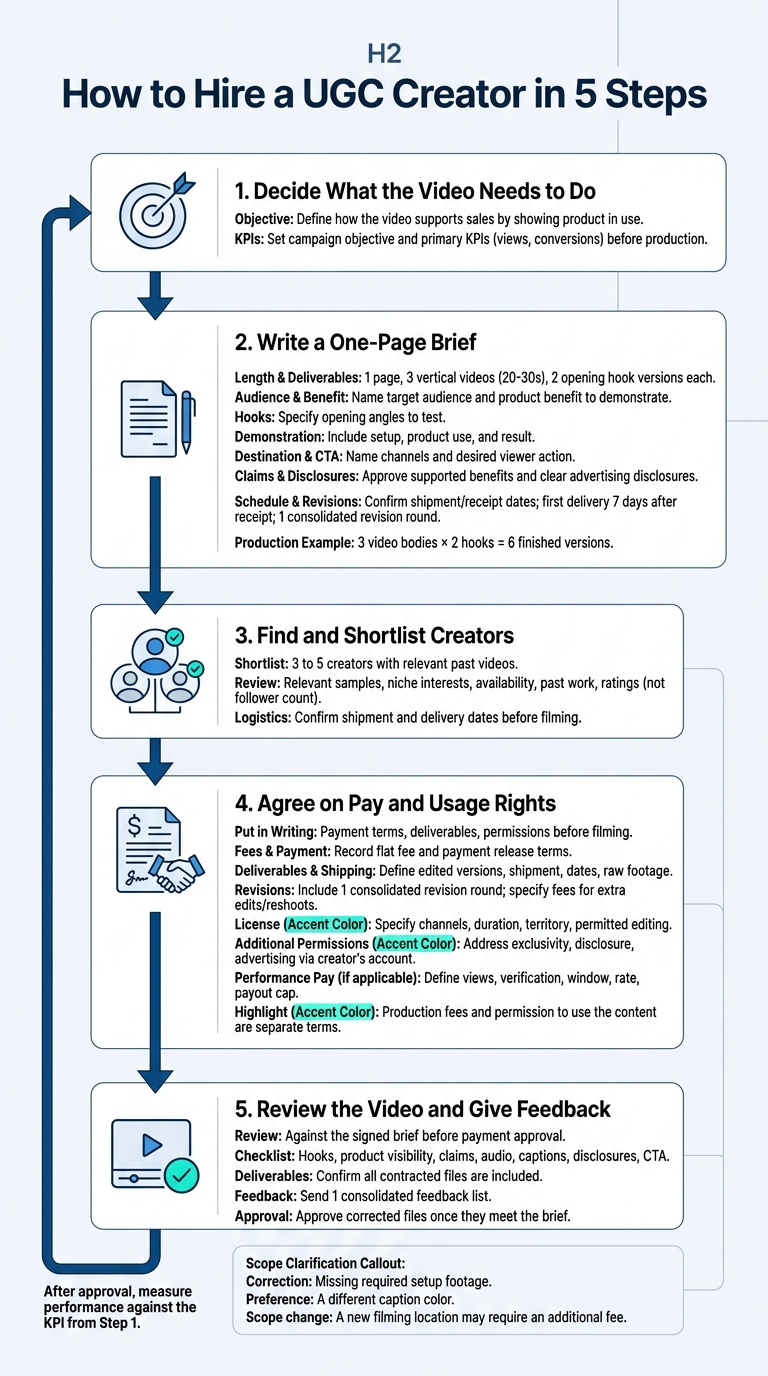
How to Hire a UGC Creator in 5 Steps
Use your budget to guide your creator search. For product demos, prioritize clear footage that shows how the product works so viewers can judge whether it meets their needs.
Step 1: Decide What the Video Needs to Do
Define how the video should support sales by showing the product in use. Set the campaign objective and primary KPI(s), such as views and conversions, before production so you can measure results.
Step 2: Write a One-Page Brief
Keep the brief to 1 page. Specify the message and required footage, but leave room for the creator to use their own wording.
- Deliverables: 3 vertical videos, each 20 to 30 seconds long, with 2 opening hook versions of each.
- Customer and benefit: Name the target audience and the product benefit the video should demonstrate.
- Hooks: Specify the opening angles you want to test.
- Visible demonstration: Include setup, product use, and the result so viewers can assess usefulness.
- Destination and CTA: Name the publishing channels and the action viewers should take.
- Claims: Approve only benefits supported by product information and the filmed demonstration.
- Disclosures: Specify a clear advertising disclosure and any required platform label so viewers know the content is sponsored.
- Schedule and revisions: Confirm shipment and expected receipt dates. Set the first delivery for 7 days after receipt, and include 1 consolidated revision round for changes within the brief.
Step 3: Find and Shortlist Creators
Shortlist 3 to 5 creators whose past videos fit your product and audience. Review relevant samples, niche interests, availability, past work, and ratings instead of follower count. Confirm shipment and delivery dates before filming so both sides know the schedule.
Step 4: Agree on Pay and Usage Rights
Put the payment terms, deliverables, and permissions in writing before filming. Both sides should know which work the fee covers and how you can use the videos.
- Fees and payment: Record the flat fee and the terms for releasing payment.
- Deliverables and shipping: Define edited versions, shipment details, delivery dates, and whether raw footage is included.
- Revisions: Include 1 consolidated revision round and specify fees for additional edits or reshoots.
- License: Specify channels, duration, territory, and permitted editing.
- Additional permissions: Address exclusivity, disclosure responsibilities, and permission to advertise through the creator’s account.
- Performance pay: Define eligible views, the verification source and fraud checks, the measurement window, the payment rate, and the payout cap.
Step 5: Review the Video and Give Feedback
Review the video against the signed brief before approving payment. Check hooks, product visibility, claims, audio, captions, disclosures, and CTA. Confirm that all contracted files are included, then send 1 consolidated feedback list.
Missing required setup footage is a correction; a different caption color is a preference. A new filming location changes the scope and may require an additional fee.
Approve the corrected files once they meet the brief. After approval, measure performance against the KPI from Step 1.
How to Measure UGC Video Results
Judge a live video on 2 levels: video quality and ad performance. A video can feel believable and persuasive but still get poor results because the targeting, offer, or landing page needs work.
Use the metric that matches your campaign goal.
| Goal | Primary metric | Decision |
|---|---|---|
| Attention | Early retention: how many viewers keep watching past the opening | Test a different first 3 seconds. |
| Traffic | Click-through rate (CTR): the share of impressions that generate clicks | Revise the body of the video or call to action (CTA). |
| Purchases | Cost per acquisition (CPA): ad spend divided by attributed purchases | Check the landing page, offer, and product-market fit. |
Compare 6 versions under the same conditions so each gets a fair test. Keep attribution settings consistent and wait for enough views and purchases before choosing the best performer.
Track each version in 1 row with its version, hook, spend, purchases, metric, and next step. Record whether you plan to revise the hook, retest the CTA, check the landing page, or increase spending on the best performer.
4 Common Mistakes When Working With UGC Creators
These 4 mistakes can affect results once a video is in production or live. Avoiding them helps protect trust, keep tests clear, and limit revisions.
| Mistake | Why it hurts | Fix |
|---|---|---|
| Presenting paid content as unpaid reviews | Paid endorsements without disclosures can create regulatory issues. | Use clear disclosures and limit claims to the creator’s actual experience. |
| Over-scripting the creator’s voice | Stiff delivery and heavy editing can make ads less believable. | Keep the creator’s conversational tone, pauses, and small imperfections. |
| Changing hooks, offers, and audiences at the same time | You can’t tell which change caused results to improve or decline. | Change 1 element at a time so you can see which change worked. |
| Reshooting the whole video instead of editing what works | Unneeded reshoots waste time and budget. | Edit or reshoot only the parts that need changes, within the agreed revision limits and permissions. |
Give feedback on each video segment: what to keep, what to change, and why. Specific feedback helps the creator revise the parts that need work without changing the parts that already work.
Final Thoughts
Brands hire UGC creators to make content for paid and organic campaigns. Results depend on the creator’s fit, a clear brief, and written usage rights. Multiple hooks and delivery styles let you test faster, provided you have the rights to edit and use those variations.
Review the work in 2 stages. First, check that it follows the brief and clearly shows the product. Then, review campaign performance to see how well the creator’s content works.
Find creators for your next brief with Everyday UGC.
FAQs
Do You Own the Content a UGC Creator Makes?
Yes, but you should agree on ownership and usage rights in writing before filming. EverydayUGC describes a model where brands license your video and run it as paid ads in their own ad accounts. Your agreement should state how the brand can use your content.
Can a UGC Creator Post the Video on Their Own Account?
Posting depends on your agreement with the brand. EverydayUGC’s default arrangement lets brands license your video for paid ads on their own accounts, so the video typically doesn’t appear on your personal profile.
You should clarify usage rights and permission to post on your own accounts during contract negotiations. Your agreement should state how the brand can use the video and whether you can share it yourself.